Guide
AI Domain Name Generator: Find a Better Domain by Chatting With an LLM
A good domain name has two jobs.
It has to work as a name: clear, memorable, easy to say, and right for the brand.
It also has to work as a domain: available, reasonably priced, and clean enough to build on.
Most domain generators only solve part of that problem. Even many AI-powered generators still feel like search boxes. You enter a keyword or short description. They return a batch of names. You adjust filters, search again, copy names into a registrar, check availability, open archive.org to see what used to be on the domain, and repeat.
That workflow is slow because naming is not just generation. It is revision.
You usually do not know exactly what you want until you see what you do not want. The names are too literal. Too cute. Too corporate. Too hard to spell. Too close to another company. Almost right, but not quite.
That is where an LLM is better.
With ChatGPT, Claude, Cursor, Codex, or another AI assistant that supports MCP, you can work the way people actually think:
Too generic.
Make it warmer.
Shorter, but not weird.
I like the second one. More like that.
Less like a SaaS tool. More like a real brand.
A traditional generator gives you output.
An LLM gives you a draft you can push against.
The missing piece is lookup. A plain LLM can brainstorm names, but it should not be trusted to know which domains are available right now. It may suggest a name that is taken, premium-priced, or worth inspecting because it has old website history.
Name Brewery adds that lookup layer. Once it is connected, your AI can check domain availability, price, archive/history links, social links, trademark search links, and buy links inside the same conversation.
You do not have to bounce between a chat window, a registrar, archive.org, and a spreadsheet.
Why an LLM beats a traditional AI name generator
The important difference is not whether a tool says it uses AI.
The difference is the interaction.
A traditional domain generator usually turns your intent into one search. You give it a keyword, industry, or sentence. It gives you names. Some tools let you filter by extension, price, length, or style. That can be useful, but it is still mostly a browse-and-filter experience.
An LLM keeps the brief alive.
It can remember that you want the name to feel premium but not sterile. It can understand that “less startup-y” means avoiding words like hub, flow, stack, cloud, base, and labs. It can compare two names and explain why one feels stronger. It can move from literal names to invented names, from safe names to sharper names, from clever names to names that will survive a sales call.
That matters because good names rarely appear in the first batch.
You discover the right name by reacting to the wrong ones.
Why a plain LLM is not enough
A raw LLM is good with language, but it doesn't have the ability to check if the domain name is already registered.
It can invent hundreds of names. Some may be good. But unless it has a lookup tool, it does not really know whether those domains are available.
That creates extra friction and inconvenience to you, the user.
You find a name you like. Then you check it on your favorite registrar, Namecheap, Cloudflare, etc.
Taken.
Premium price.
Wrong extension.
Old website history you need to inspect.
The creative work happens in the AI chat. The practical work of looking up the domain happens in another browser tab. You lose momentum copy and pasting back and forth.
Name Brewery keeps those pieces together. The LLM handles taste, language, and revision. Name Brewery supplies the live domain availability and links to archive.org so you can inspect domain history.
What Name Brewery adds
Name Brewery gives your AI a domain lookup tool that is integrated into your chat.
It can return:
- domain availability
- premium-domain signals
- archive/history links
- social handle links
- trademark search links
- buy links
Name Brewery does not decide whether a domain is good. It does not judge whether a domain’s past is safe. It gives you the information and links you need to inspect.
That distinction matters.
If a domain has archive history, open the history link yourself. A previous website does not automatically make a domain bad. Many dropped domains are fine. In fact, may love buying aged domains for their existing backlinks. But if the old site looks spammy, unrelated, low quality, or suspicious, slow down before buying.
Use Name Brewery to surface the evidence and speed up your research so you can use your own judgement before buying the domain name.
Which AI apps can connect to Name Brewery?
Name Brewery works through MCP, the Model Context Protocol. MCP lets an AI assistant (like Claude) connect to outside tools.
Support changes quickly, and some apps gate MCP behind plan, workspace, or developer settings. Check your own account if you do not see the option.
The common paths are:
| App | Best for | Notes |
|---|---|---|
| Claude | Most non-technical users | Claude supports custom connectors on free and paid plans. Free users can add one custom connector. |
| ChatGPT | Users on ChatGPT plans/workspaces that support custom MCP apps | Custom MCP apps require Developer Mode. OpenAI currently documents full MCP support as beta for Business, Enterprise, and Edu; Pro users may have limited read/fetch MCP access in Developer Mode. Setup depends on workspace/admin settings. |
| Cursor | Developers already working in Cursor | Cursor supports MCP servers for tools and external data. |
| Claude Code | Developers using Claude in the terminal | Claude Code can connect to remote HTTP MCP servers. |
| Codex | Developers using Codex CLI or the Codex IDE extension | Codex supports MCP servers in its developer workflow. |
| VS Code with GitHub Copilot | Developers working in VS Code | VS Code supports MCP servers with Copilot agent mode. |
| Gemini CLI | Developers using Gemini from the command line | Gemini CLI supports MCP servers. |
| Google Antigravity | Developers using Google’s agentic IDE | Antigravity supports MCP servers. |
For most readers, Claude is the easiest place to start. If you already work in Cursor, Claude Code, Codex, VS Code, Gemini CLI, or Antigravity, use the tool where you already work.
Set up Name Brewery
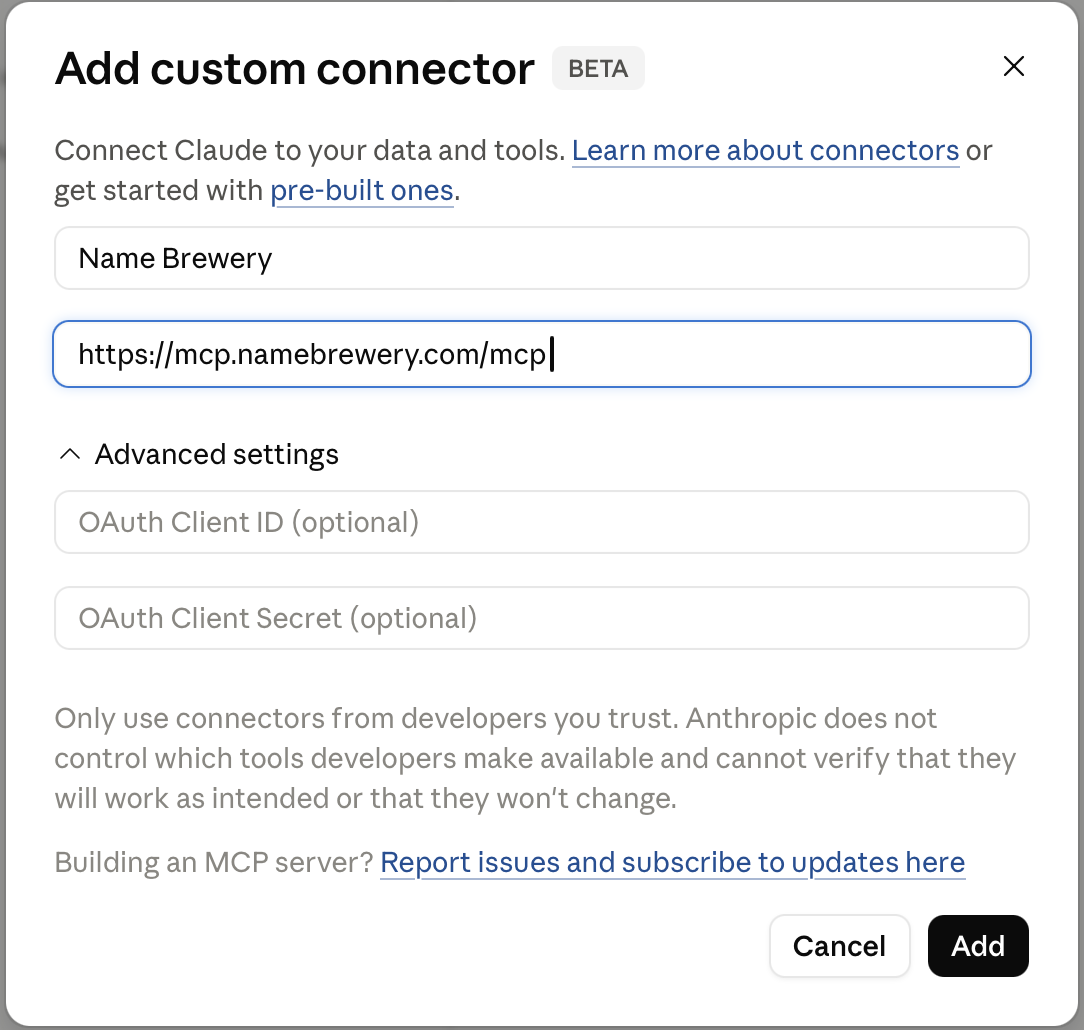
Use this MCP server URL:
https://mcp.namebrewery.com/mcp
In Claude, the setup looks like this:
After setup, open a new chat.
You usually do not need to keep saying “use Name Brewery.” for LLMs like Claude, but for ChatGPT, you may have to call out the tool specifically. ChatGPT may not know to call the tool unless you type something like "Use Name Brewery to check the domain availability". You will have to experiment with asking for available domains in normal language, or tell it to use the connected MCP. The assistant should understand that availability matters and use the connected tool when it needs current domain information.
For example:
Find me a few available domains for a modern kite shop.
That is enough to begin.
A note on credits
Name Brewery checks domains in batches.
One credit covers up to 30 domain checks. New accounts include 20 free credits, which is up to 600 domain checks.
That is enough room to explore. You do not need to be afraid of every lookup.
Still, better direction saves time. Do not spend checks on names you already know you would reject. Give the AI enough taste and constraints to avoid obvious waste, then refine naturally.
Start broad enough to discover something.
Be specific enough to avoid junk.
React quickly when the direction is wrong.
Start with what you know
Do not write a giant prompt unless you already have a clear brief.
Start with the business and a little taste.
Find me a domain for a premium coffee gear store. Calm, precise, and design-conscious.
I need a name for a meal-planning app. Short, friendly, not too cute.
Find available domains for a boutique fitness studio. Clean and confident.
I’m naming an AI tool that summarizes customer interviews. I want something credible, not gimmicky.
The first answer is not supposed to be final. It gives you material.
Read the names. Notice what is wrong. Then chat with the LLM and let it know what's wrong.
Give direction before lookup-heavy exploration
A few constraints can save wasted checks.
You do not need a long brief. Tell the AI what a serious candidate looks like.
Prefer .com.
No hyphens or numbers.
Nothing with AI in the name.
Avoid hub, lab, flow, cloud, stack, and base.
Shorter is better.
No names that are hard to spell.
I want real words or natural-sounding invented words.
Only check names that seem like serious candidates.
That last line is useful. It lets the LLM brainstorm freely without checking every weak idea.
React sharply
Once you see options, respond directly.
Too generic.
Too corporate.
Too cute.
Too literal.
More premium.
Warmer.
Shorter.
Less software.
More memorable.
I like the second one. More like that.
Short feedback is enough. The LLM can use it.
Ask for what you want
When you are generating new candidates, steer toward the names you want.
Instead of asking:
Which of these are easiest to mishear?
Ask:
Find names that are easy to say and hard to mishear.
Instead of asking:
Which names are too long?
Ask:
Show me shorter names.
Instead of asking:
Which names have spelling problems?
Ask:
Show me names that are easy to spell after hearing once.
You can still critique a shortlist later. But while generating, point the search at what you want.
Use taste words
Naming is partly emotional. Say the thing plainly.
Make it feel more expensive.
Make it quieter.
More physical, less digital.
More like a magazine, less like an app.
More like a real brand, less like a keyword domain.
Clean, but not sterile.
Warm, but not cozy.
Modern, but not trendy.
This is where an LLM is useful. You do not have to translate taste into dropdown filters.
Use examples
Examples are faster than long explanations.
I like names like Stripe, Linear, Notion, and Figma. I want that kind of clarity, but not a copy.
I like Aesop and Everlane because they feel calm and grown-up.
I dislike names with hub, lab, cloud, flow, base, stack, or genius.
I want something closer to a consumer brand than a SaaS tool.
The reason matters more than the example.
I like “Field” because it is simple, visual, and flexible.
That gives the model a pattern to follow.
Ask for available domains, not just names
A name idea is not enough.
Ask for domains you can actually consider.
Show me available domains only.
Prefer .com. Use other extensions only if the name is much stronger.
Only show normal-priced options.
Avoid names with obvious archive history if there are clean alternatives.
Give me the strongest available options, not a long list.
Only check names that fit the brief well.
If the assistant gives you an unchecked brainstorm, correct it:
These are just ideas. Now show me available domains I can actually consider.
What the workflow looks like
A good naming session is simple.
You ask.
The AI checks.
You react.
The AI checks again.
Here is an example from a kite-shop prompt. The assistant brainstorms names, checks availability, and brings back a shortlist instead of making you search each name by hand.
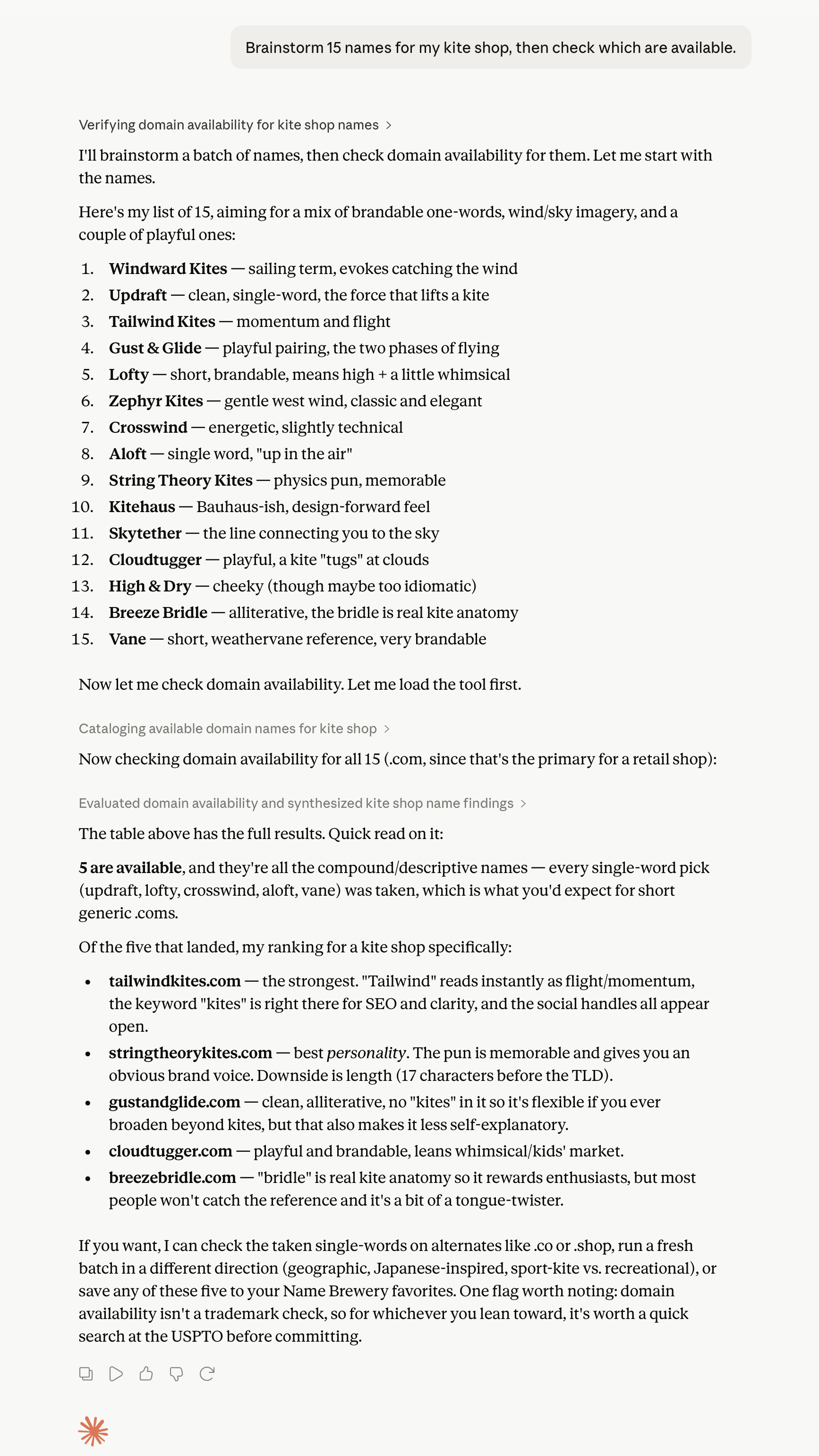
The key is not the first list. The key is the invitation to keep going.
You might reply:
Too obvious. I do not want the word kite.
Then:
Better. Make them feel more premium and outdoorsy.
Then:
Only .com. Shorter names. Easy to spell.
Now the search is improving.
Explore different naming directions
If the list feels flat, change the direction.
Try more metaphorical names.
Try invented names.
Try real-word names.
Try names that suggest speed and motion.
Try names around craft, care, and precision.
Try names that do not mention the category directly.
Try names that would still work if the company expands.
This is better than asking for “more.” More of the wrong direction is a waste of your free credits.
Add constraints when the direction improves
Once you start seeing names you like, tighten the rules.
Only .com.
Under 10 characters before the dot.
No hyphens.
No numbers.
No doubled letters.
Easy to spell after hearing once.
Easy to say in a podcast ad.
Looks good in lowercase.
Works as an email address.
Does not box us into one product category.
The right constraints save time and credits. The wrong constraints make the search too narrow. Add them when they help.
Use constraints normal generators miss
LLMs are good at sound, shape, and use.
That lets you ask for names a generic domain generator would not know how to find.
Names with a good typing rhythm
Create some domains that are short and can be typed with a nice rhythm. The shorter the better.
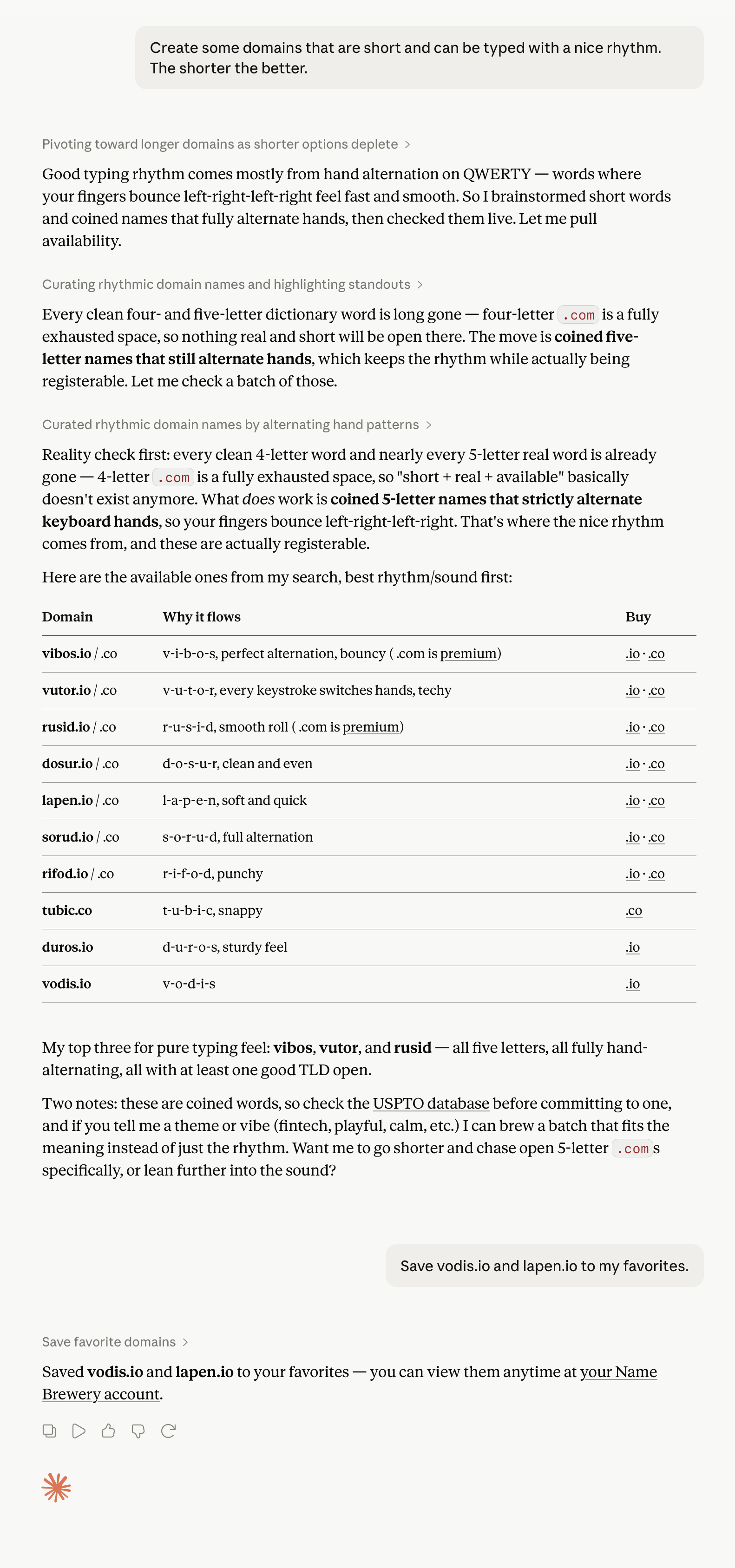
The assistant can reason through the constraint, discard names that are gone, and return available options that fit the pattern.
Names built around keyboard constraints
Come up with some domain names that I can type with just the home row keys.
Then you can refine:
Or just my index fingers.
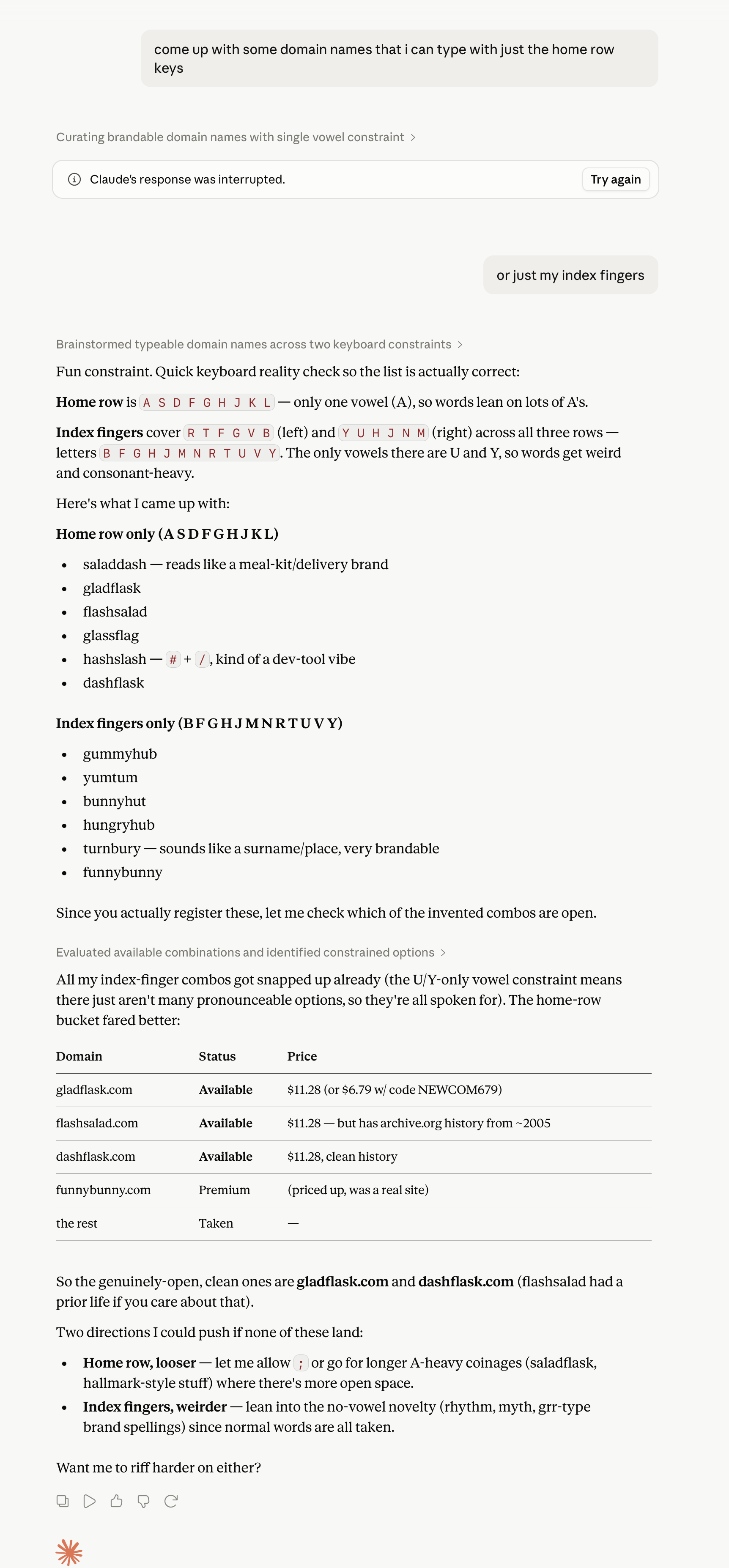
This is the kind of odd, human constraint that works well in chat. You do not need a domain generator to have a “home row only” filter. You just ask.
Names that are easy to type with one hand
I want a domain I can type with one hand. Shorter is better.
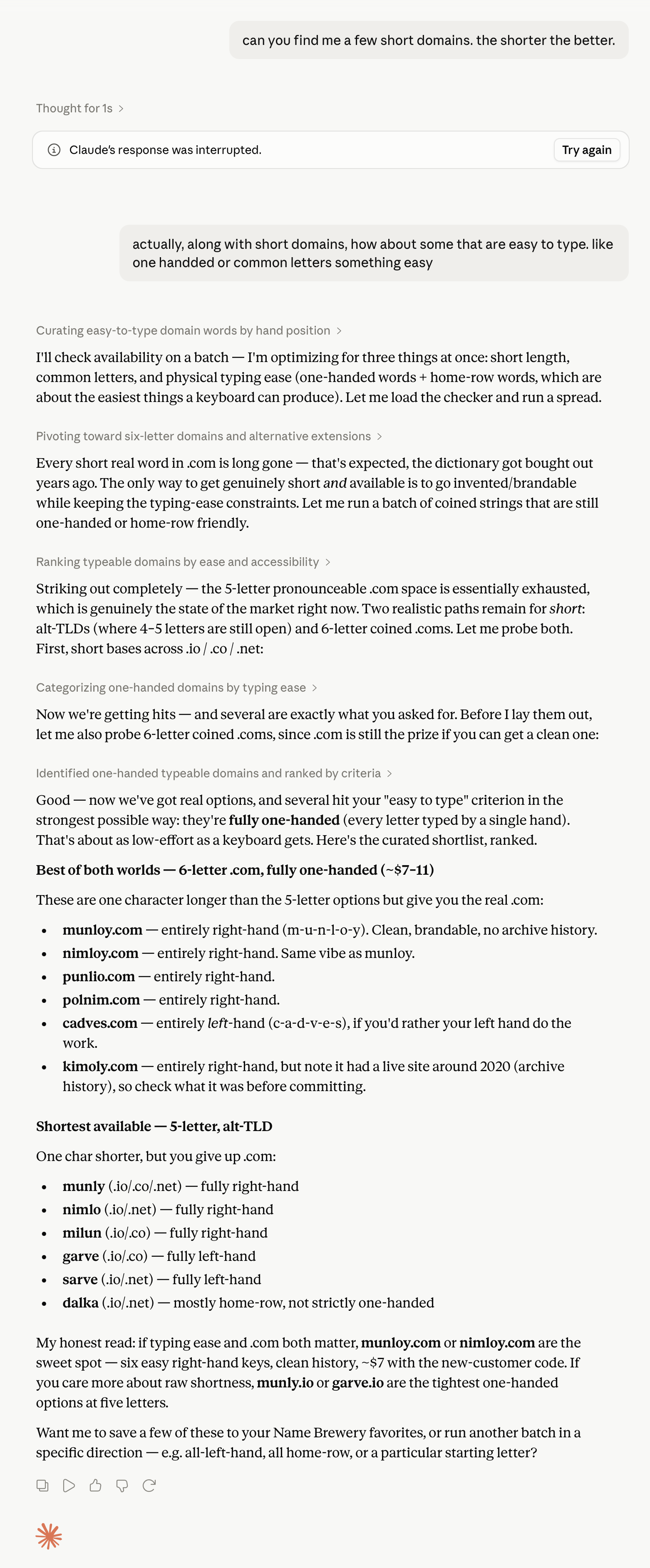
You can define the constraint, let the LLM reason through it, and get checked options back. Don't like the results? Refine with the LLM till you get something you like.
Other useful prompts:
Find names that sound good when spoken aloud.
Find names that are hard to mishear.
Find names that feel calm, not clever.
Find names that look balanced in lowercase.
Find names that work in English but are easy for non-native speakers to pronounce.
These prompts push the model beyond obvious keyword combinations.
Ask for a clean shortlist
Do not ask for hundreds of names unless you want to sort through noise.
Ask for the best few.
Give me the five strongest available options so far.
Rank the best names by brand fit and domain quality.
Separate these into strong candidates, possible but flawed, and rejects.
Tell me which two you would actually choose.
A good shortlist is more useful than a large dump.
Check the domain’s past manually
Before buying, inspect the domain’s history.
Name Brewery can provide direct archive.org links. It let's you judge the quality of the past site.
Open the history link and look at what used to be on the domain.
Watch for:
- spammy pages
- thin affiliate content
- casino, adult, crypto, or other unrelated uses
- suspicious redirects
- a site in a totally different language or industry
- a brand that may still be active elsewhere
None of these automatically means “do not buy.” But they are reasons to slow down.
A clean domain history is easier to build on. A messy history may still be usable, but you should know what you are buying. Some people believe aged domains that have strong backlinks allow you to rank in search engines better.
Check real-world usability
Once you have a serious shortlist, you can have the LLM help you sort even more.
Use prompts that push toward the outcome you want:
Rank these by clarity, memorability, and ease of spelling.
Which name is strongest for word of mouth?
Which name would be easiest to say in a sales call?
Which name gives the brand the most room to grow?
Which one works best as an email address and social handle?
Which name is the safest serious choice?
Which name is the boldest good choice?
Now the lookup work is mostly done. You are choosing.
Use a fuller brief when you want to save time
A piecemeal chat is natural. It is often the best way to start.
A fuller brief helps when you already know the direction or want to reduce wasted checks.
Use this:
I’m naming [business/product].

Audience:
[Who it is for]

What it does:
[Plain description]

Brand feel:
[3–5 adjectives]

Avoid:
[Words, styles, competitors, or tones you dislike]

Preferences:
[.com, short, easy to spell, no hyphens, invented names, real words, etc.]

Find available domain options and show me the strongest candidates. Only check names that fit the brief well. Include the main pros, cons, price signals, history links, and practical risks.
Example:
I’m naming an online store for premium manual coffee gear: grinders, kettles, scales, and pour-over accessories.

Audience:
People who care about design, ritual, and high-quality coffee at home.

Brand feel:
Calm, precise, modern, tactile, premium.

Avoid:
Anything goofy, overly startup-like, or too literal. Avoid brew, bean, hub, lab, and gear.

Preferences:
Prefer .com. Shorter is better. Easy to spell. No hyphens.

Find available domain options and show me the strongest candidates. Only check names that fit the brief well. Include the main pros, cons, price signals, history links, and practical risks.
That is enough.
The prompt should guide the conversation, not turn it into paperwork.
A practical naming session
A strong session might look like this:
Find me a few available domains for a modern kite shop. No obvious kite words.
The assistant returns options.
You respond:
Too playful. Make them feel more premium and outdoorsy.
It tries a better direction.
Only .com. Shorter names. Easy to spell.
The list gets tighter.
Give me the five strongest options so far.
Now inspect the archive links for the finalists.
Then ask:
Rank the remaining names by brand fit, memorability, and room to grow.
Let the LLM handle the bulk of the mental load so you can spend it more on deciding the best out of the presented choices.
What to avoid
- Do not expect the first answer to be perfect. It is a starting point.
- Do not ask for a huge list when you need a sharper direction.
- Do not burn checks on names that do not fit your taste.
- Do not fall in love with a name before checking availability.
- Do not treat availability as approval. A domain can be available and still be a weak name.
- Do not skip history. A domain with messy prior use may not be worth the trouble as search engines may not feature it in results.
- Do not skip trademark review. Domain availability is not legal clearance.
The better workflow
Use the LLM for taste, language, and revision.
Use Name Brewery for lookup.
Keep it all in the LLM to save you from too many open tabs.
The LLM understands your brief and your corrections. Name Brewery supplies the domain facts and links: availability, price, archive history, social links, trademark search links, and buy links.
Together, they remove the worst part of domain naming: bouncing between brainstorming, registrar searches, archive checks, and notes.
You can work in one place.
Ask for a name.
Get available options.
React.
Refine.
Inspect history.
Compare the shortlist.
Buy with more conviction that you've chosen the correct name for your brand.
A good domain rarely appears in one click. It emerges through revision.
The best AI domain name generator is not just a generator. It is a conversation with live domain lookup.
Connect your AI to Name Brewery
Use the MCP server once, then find and refine available domains inside the AI assistant you already use.
Connect your AI